Formula parameters
The bottom pane on various tabs of the Layer
Properties tool window shows all formula parameters that are specific to the selected
transformation, fractal formula, or coloring algorithm. It's easy to see which parameters have been changed from their default values because they are highlighted in bold.
There are eight types
of parameters:
- Complex parameters consist of a real and an imaginary value. They
appear as two input boxes labeled with "(Re)" and "(Im)"
after the name of the parameter. Right-click one of the input boxes to open
a menu with additional options.
- Floating-point parameters specify a single floating-point value (such
as -0.2 or 3.14).
- Integer parameters specify an integer value (such as -2 or 3).
- Enumerated parameters appear as a drop-down box. They are typically
used to select one of various behaviors, or to choose between a number of
options.
- Color parameters specify a color and are typically used only by direct
coloring algorithms. They appear as a color swatch. Click it to adjust
the color. Right-click it to open a menu with additional options.
- Boolean parameters appear as a checkbox. They are used to turn options
on or off.
- Plug-in parameters provide a way to extend a formula with additional features. See Plug-ins.
- Image parameters, typically used in coloring algorithms, enable importing external images. See Using images.
Many formulas require a bit of experimentation with the parameters to learn
how to use them. For new users, it is best to stick to the standard
formulas and learn how to use these first.
 |
|
Some formulas (such as the standard formulas) contain additional help.
To access it, click the Help button.
|
 |
|
To copy the formula settings (including parameter values) between layers,
click the More button, and then click Copy or Paste.
|
| |
|
To reset all parameters to their default values, click the More
button, and then click Reset Parameters. To reset an individual parameter to its default value, right-click it and click Set to Default. If a parameter is not at its default value, it is highlighted in bold: this shows you at a glance which parameters have been tweaked.
|
In some formulas, such as Orbit
Traps, parameters are divided into groups by headings.
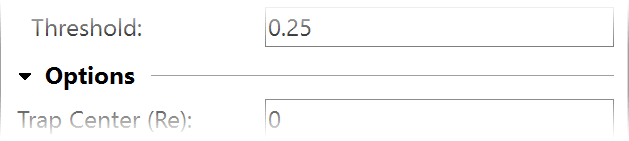
You can collapse and expand the heading and the parameters below
it by clicking on the arrow button. Right-click the heading for a menu with
commands to collapse and expand all headings.
Notes
- You can horizontally resize the area reserved for parameter labels, for example to make more space available for long labels. Simply position the mouse cursor just left of a parameter input box so it turns into a horizontal resize cursor, and drag this edge to where you want it to be. Double-click here to reset the label area to the default size.
- Many formulas contain help for individual parameters. Make sure the Fractal
Mode tool window is visible and hover the mouse cursor over a parameter
to see its help text, if one exists.
- The Explore feature makes it easy to try new parameter values.
- If multiple layers or transformations are selected that do not use the same formula, the list of parameters remains empty.
- You can easily copy complex values from one parameter to another. Right-click
a complex parameter and click Copy Complex Value or Paste Complex
Value. You can also copy coordinates between the Location tab and a complex
parameter in this way. To copy a color parameter, right-click it and click
Copy or Paste.
Next: Explore
See Also
Animating parameters
Fractal
formulas
Working with fractal formulas