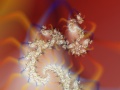
The Direct Orbit Traps coloring algorithm is a direct coloring algorithm. This means that it the resulting images are not limited to the colors in the gradient. It usually creates softly shaded, pastel-like images.
Direct Orbit Traps is available as a coloring algorithm in Standard.ucl and as a coloring plug-in in Standard.ulb. As a coloring plug-in, it uses several plug-in parameters instead of normal parameters to make it easier to add new trap shapes and coloring options. See Example 2 - Orbit trap plug-ins and Combining fractals with images for more information. You need to combine the Direct Orbit Traps plug-in with Plug-In Coloring (Direct).
Direct Orbit Traps works by calculating a color for every iteration. These colors are merged together to obtain the final color for each pixel. This is like using multiple layers within a single coloring algorithm.
The colors are taken from the gradient and merged onto the background color. If you change the gradient, the layer is recalculated with the new colors. It can sometimes be difficult to predict the effect of changes to the gradient, because the gradient colors are merged with each other and with the background color.
Most of the parameters are shared with Orbit Traps. There are some additional parameters that specify how the colors from each iteration are merged:
| Base Color |
Specifies the background color. All other colors are merged on top of the background, so the background color interacts with the colors from the gradient. The background color can also be transparent. |
| Trap Color Merge |
Specifies the merge mode used to merge colors on top of the background. All layer merge modes are supported here. Remember to adjust the background color so it will work well with the selected merge mode. For example, use a dark background color with Screen, and a light background color with Multiply. |
| Additional Alpha |
If set to distance, the opacity of the color calculated for each iteration is reduced according to the distance from the trap shape. This can create very soft and smooth images. (In the plug-in version of Direct Orbit Traps, this parameter is grouped with Color Trap.) |
| Trap Merge Opacity |
Sets the opacity (between 0 and 1) of the color calculated for each iteration. The opacity of the gradient is also taken into account, just like when merging layers. |
| Trap Merge Order |
Sets the order in which traps are merged. The bottom-up option merges later iterations on top of the existing iterations, while the top-down option merges later iteration underneath the existing iterations. |
| Color Trap | (Plug-in version only.) This selects the color trap plug-in that is responsible for converting z values to colors. Normally, Trap Shape Wrapper is selected, which wraps a trap shape plug-in, a trap coloring plug-in and a gradient plug-in to do this. However, you could also select another plug-in, such as Image Trap from common.ulb which returns colors from an imported image. |
See Also
Orbit Traps
Standard coloring algorithms
Example 2 - Orbit trap classes
Combining fractals with images