





It is not currently possible to upload new formulas to the database.
When I try to do so, I'm directed to this page:
https://formulas.ultrafractal.com/error.htm

Also, it is not possible to update public formulas via File > Update Public Formulas. The error message is "IOSHandler value is not valid."

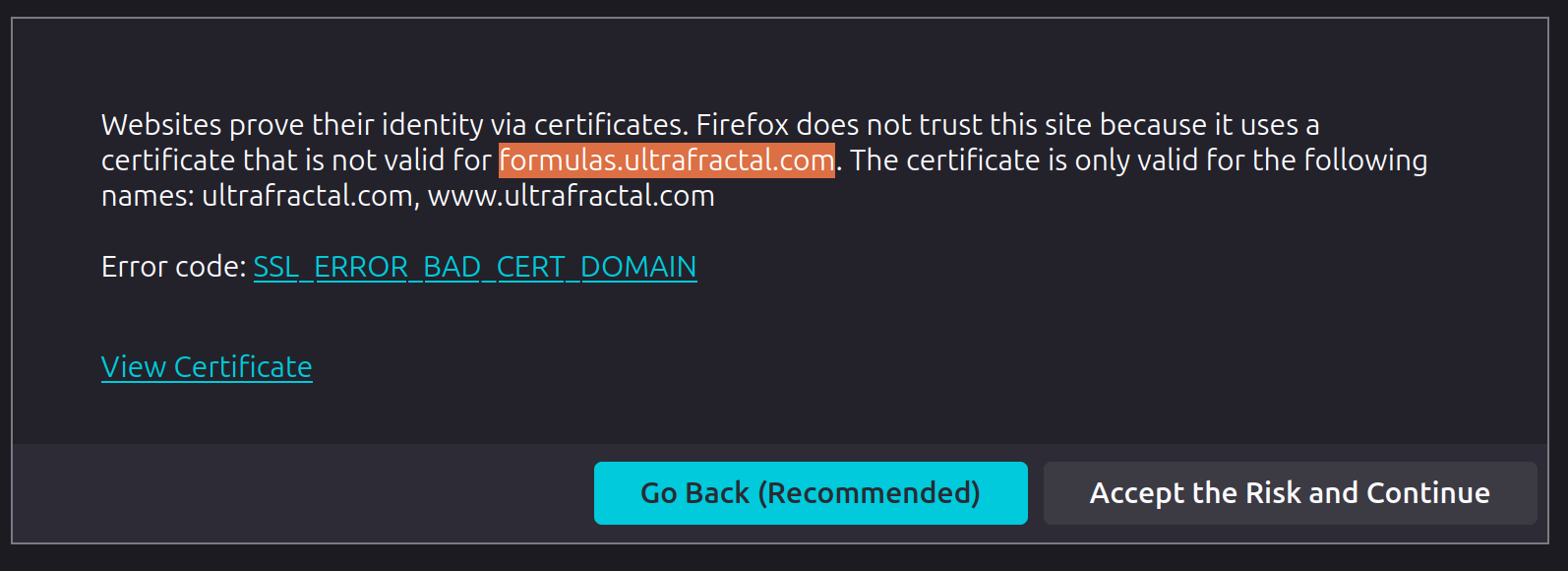
In addition, when accessing the formula section of the site, some people are getting an "invalid certificate" warning. It doesn't bother me, because this is a trustworthy site, but I know several people who are unwilling to proceed when they see this message.

It is not currently possible to upload new formulas to the database. When I try to do so, I'm directed to this page: https://formulas.ultrafractal.com/error.htm Also, it is not possible to update public formulas via File > Update Public Formulas. The error message is "IOSHandler value is not valid." In addition, when accessing the formula section of the site, some people are getting an "invalid certificate" warning. It doesn't bother me, because this is a trustworthy site, but I know several people who are unwilling to proceed when they see this message.
 
0
reply

Good afternoon, Otto! I'm also unable to update public formulas via Chrome and Edge. For me, I can only update public formulas via Firefox...

Good afternoon, Otto! I'm also unable to update public formulas via Chrome and Edge. For me, I can only update public formulas via Firefox...
edited Apr 16 at 7:52 pm
 
0
reply

Ah, that's interesting. I had only tried, successfully, via Firefox. Just tried Edge and Chrome.... no problem there either!

Ah, that's interesting. I had only tried, successfully, via Firefox. Just tried Edge and Chrome.... no problem there either!
 
0
reply

The update error in UF has been fixed again. Apparently there is a configuration error on the server that lets it automatically redirect to HTTPS which doesn't work with UF's download feature. I'm in contact with my hosting provider to address this.

Long term, I need to move the formula database to HTTPS but there's a bunch of technical issues with this. For now, just click through the certificate warnings to access the non-HTTPS part.

The update error in UF has been fixed again. Apparently there is a configuration error on the server that lets it automatically redirect to HTTPS which doesn't work with UF's download feature. I'm in contact with my hosting provider to address this. Long term, I need to move the formula database to HTTPS but there's a bunch of technical issues with this. For now, just click through the certificate warnings to access the non-HTTPS part.

Ultra Fractal author

 
0
reply

I haven't been able to update to the formula database in a long time. I refuse to send my password over an unencrypted HTTP connection and HTTPS doesn't work. That's the end of it.

I haven't been able to update to the formula database in a long time. I refuse to send my password over an unencrypted HTTP connection and HTTPS doesn't work. That's the end of it.
 
0
reply

I just updated the formula database to work with HTTPS. Please try it and let me know if you run into any problems!

I just updated the formula database to work with HTTPS. Please try it and let me know if you run into any problems!

Ultra Fractal author

 
0
reply

It seems the current certificate is still not covering the right domain(s).

685d14808aa12.png

It seems the current certificate is still not covering the right domain(s). ![685d14808aa12.png](serve/attachment&path=685d14808aa12.png)
edited Jun 26 at 10:37 am
 
0
reply

I uploaded my formulas using Firefox after Frederik sent his message and it worked; Firefox didn't complain. Before he made the change, Firefox didn't allow updating, but didn't show any message.

I'm only using Microsoft Defender; maybe you are using something else.

I uploaded my formulas using Firefox after Frederik sent his message and it worked; Firefox didn't complain. Before he made the change, Firefox didn't allow updating, but didn't show any message. I'm only using Microsoft Defender; maybe you are using something else.
edited Jun 27 at 1:12 pm
 
0
reply

Nope, just Firefox with "Strict" security setting. Maybe you configured your security too lax. Check if you see a green padlock or shield left of the address bar.

Nope, just Firefox with "Strict" security setting. Maybe you configured your security too lax. Check if you see a green padlock or shield left of the address bar.
 
0
reply

It's working well for me. No warning messages.

It's working well for me. No warning messages.
 
0
reply

To the left of the address, I see

A white shield = no tracers found
A padlock = verified
A sign 685f049d77baa.png
= "You have given this website additional permissions"

(I don't remember doing that, but maybe I did.)

To the left of the address, I see A white shield = no tracers found A padlock = verified A sign ![685f049d77baa.png](serve/attachment&path=685f049d77baa.png) = "You have given this website additional permissions" (I don't remember doing that, but maybe I did.)
 
0
reply

I've moved the formula database from formulas.ultrafractal.com to https://www.ultrafractal.com/formulas. It should redirect but maybe you could try this link directly instead?

I've moved the formula database from formulas.ultrafractal.com to https://www.ultrafractal.com/formulas. It should redirect but maybe you could try this link directly instead?

Ultra Fractal author

 
0
reply

File->Update Public Formulas is working fine for me in the UF app. But I’m not uploading formulas so I don’t know if that’s still a problem.

File->Update Public Formulas is working fine for me in the UF app. But I’m not uploading formulas so I don’t know if that’s still a problem.

http://www.youtube.com/fractalzooms

 
0
reply
351
views
13
replies
6
followers
live preview
Enter at least 10 characters.
WARNING: You mentioned %MENTIONS%, but they cannot see this message and will not be notified
Saving...
Saved
All posts under this topic will be deleted ?
Pending draft ... Click to resume editing
Discard draft