






A power outage interrupted my render job.
After 6 hours of rendering, It stopped at frame 314 of 480 total PNG frames.
When the power was restored the render began again at frame 1. There was no option to restart at frame 314.
If there were a "Frame Range" option I could have restarted at frame 314.

A power outage interrupted my render job. After 6 hours of rendering, It stopped at frame 314 of 480 total PNG frames. When the power was restored the render began again at frame 1. There was no option to restart at frame 314. If there were a "Frame Range" option I could have restarted at frame 314.
 
0
reply

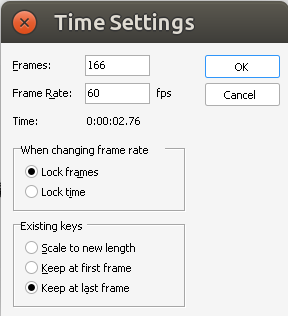
This is possible with a workaround.
480−314=166
687264828e23a.png

You'll need an external application or command line script to renumber the new frames. My personal recommendation is Total Commander.

This is possible with a workaround. 480−314=166 ![687264828e23a.png](serve/attachment&path=687264828e23a.png) You'll need an external application or command line script to renumber the new frames. My personal recommendation is Total Commander.
edited Jul 12 at 2:36 pm
 
0
reply

There is a Frame Range option in the Animation section when rendering animations, in the Render to Disk dialog box.

There is a Frame Range option in the Animation section when rendering animations, in the Render to Disk dialog box.

Ultra Fractal author

 
0
reply

The File Number Offset field in UF’s Render window is handy for this. Post-render file renaming can take a while on long animations.

The File Number Offset field in UF’s Render window is handy for this. Post-render file renaming can take a while on long animations.

http://www.youtube.com/fractalzooms

 
0
reply
153
views
4
replies
4
followers
live preview
Enter at least 10 characters.
WARNING: You mentioned %MENTIONS%, but they cannot see this message and will not be notified
Saving...
Saved
All posts under this topic will be deleted ?
Pending draft ... Click to resume editing
Discard draft